What you will learn
- How to create a React app with Vite, and how its dev proxy talks to Spring Boot
- React's core ideas: components, JSX, props, state, effects, context and hooks
- How to structure a real app into pages, components, hooks and an API layer
- Login, sign-up and protected pages with the JWT from chapter 4
- The feed, a post composer, profiles, replies, likes, follows and notifications
- Optimistic updates and "load more" pagination
Why it matters
The backend from chapter 4 is complete, but nobody can use an API with curl. The frontend is the part people judge the whole product by: it must feel instant, show errors clearly, and never leak another person's data or run their text as code. Almost every modern web app uses the same patterns you build here: an API client, an auth context, page components and reusable hooks.
Create the React app
A browser understands HTML, CSS and plain JavaScript. React code is written in JSX (HTML-like tags inside JavaScript) and split into many small files with import. A build tool turns that into files a browser can load. We use Vite: it starts in a fraction of a second, reloads the page the moment you save a file, and produces small optimised files for production.
Go to the chirp folder from chapter 1 (next to backend) and create the app with Vite's official React template:
cd chirp
npm create vite@latest frontend -- --template react
cd frontend
npm install
npm install react-router
◇ Scaffolding project in /home/you/chirp/frontend...
│
└ Done. Now run:
cd frontend
npm install
npm run dev
added 24 packages in 15s
added 3 packages, and audited 28 packages in 2s
found 0 vulnerabilitiesreact-router is the library that shows a different page for each URL (/, /login, /u/alice) without reloading the browser. Since version 8 everything is imported from react-router; the older react-router-dom package no longer exists.
The template contains a demo counter (App.css, index.css, src/assets). Delete those; we replace every file in src/. When you are done, the project looks like this:
frontend/
├── index.html                 the one HTML page; React fills <div id="root">
├── package.json               dependencies and scripts (dev, build, lint)
├── vite.config.js             dev server + proxy to Spring Boot
├── public/favicon.svg
└── src/
    ├── main.jsx               starts React
    ├── App.jsx                which page for which URL
    ├── styles.css
    ├── api/
    │   ├── client.js          fetch + token + errors, in one place
    │   └── chirp.js           one function per backend endpoint
    ├── auth/
    │   ├── AuthContext.js     shared "who is logged in"
    │   ├── AuthProvider.jsx   logs in, logs out, checks a saved token
    │   └── useAuth.js         hook to read it from any component
    ├── hooks/usePagedPosts.js "load more" lists of posts
    ├── components/            Layout, PostCard, PostList, PostComposer, …
    ├── pages/                 FeedPage, ProfilePage, PostPage, LoginPage, …
    └── utils/timeAgo.js       "5m", "3h", "Nov 5"
package.json, index.html and the favicon
package.json lists what the app needs. dependencies ship to the browser; devDependencies are only tools (Vite, the React plugin for Vite, the oxlint linter that the Vite template now uses instead of ESLint). The caret in ^19.3.1 means "19.3.1 or any newer 19.x".
{
  "name": "chirp-frontend",
  "private": true,
  "version": "0.0.1",
  "type": "module",
  "scripts": {
    "dev": "vite",
    "build": "vite build",
    "lint": "oxlint",
    "preview": "vite preview"
  },
  "dependencies": {
    "react": "^19.3.1",
    "react-dom": "^19.3.1",
    "react-router": "^8.5.1"
  },
  "devDependencies": {
    "@types/react": "^19.3.0",
    "@types/react-dom": "^19.3.0",
    "@vitejs/plugin-react": "^6.1.2",
    "oxlint": "^1.90.0",
    "vite": "^8.3.6"
  }
}
index.html is the only HTML page. It is almost empty on purpose: React builds everything inside <div id="root">. That's why this is called a single-page application (SPA).
<!doctype html>
<html lang="en">
  <head>
    <meta charset="UTF-8" />
    <link rel="icon" type="image/svg+xml" href="/favicon.svg" />
    <meta name="viewport" content="width=device-width, initial-scale=1.0" />
    <title>Chirp</title>
  </head>
  <body>
    <div id="root"></div>
    <script type="module" src="/src/main.jsx"></script>
  </body>
</html>
<svg xmlns="http://www.w3.org/2000/svg" viewBox="0 0 32 32"><rect width="32" height="32" rx="8" fill="#1d9bf0"/><path d="M8 19c5 3 12 2 15-5l2-1-2-1c-1-3-5-4-7-1-4-1-6-2-8-4-1 3 0 5 2 7l-2 0c1 2 2 3 4 3-1 1-3 2-4 2z" fill="#fff"/></svg>main.jsx: starting React
createRoot(...).render(...) hands the #root element to React. Around <App /> we put three wrappers, each giving every component inside it a capability:
StrictMode: development-only checks. It deliberately runs some code twice to expose bugs (more on that in the mistakes section).BrowserRouter: keeps the URL and the page on screen in sync.AuthProvider: our own component that remembers who is logged in (section Authentication).
import { StrictMode } from 'react';
import { createRoot } from 'react-dom/client';
import { BrowserRouter } from 'react-router';
import App from './App.jsx';
import { AuthProvider } from './auth/AuthProvider.jsx';
import './styles.css';

createRoot(document.getElementById('root')).render(
  <StrictMode>
    <BrowserRouter>
      <AuthProvider>
        <App />
      </AuthProvider>
    </BrowserRouter>
  </StrictMode>,
);
vite.config.js: the dev proxy, and why we never need CORS
During development, Vite serves the React app on http://localhost:5173 and Spring Boot runs on http://localhost:8080. To the browser those are two different origins (the port counts). By default browsers block JavaScript from reading responses from another origin unless the server sends special CORS headers.
We sidestep the whole problem: the React code only ever calls /api/… on its own origin, and Vite forwards those requests to Spring Boot. The browser sees one origin, so there is nothing to allow. In production (chapter 8) nginx plays the same role.
import react from '@vitejs/plugin-react';
import { defineConfig } from 'vite';

export default defineConfig({
  plugins: [react()],
  server: {
    // The browser talks only to Vite (localhost:5173). Vite forwards /api to Spring Boot,
    // so both look like the same origin and the browser never needs CORS.
    proxy: {
      '/api': 'http://localhost:8080',
    },
  },
});/api to Spring Boot, so no CORS rules are needed.- The browser loads the page and the JavaScript from Vite (
localhost:5173). - React calls
fetch('/api/feed'). The URL has no host, so it goes to the same origin: Vite. - Vite sees the
/apiprefix in itsproxysettings and forwards the request, headers included, tolocalhost:8080. - Spring Boot checks the JWT and runs the feed queries from chapter 4.
- The JSON answer goes back to Vite…
- …and Vite hands it to the browser, which thinks it all came from
localhost:5173.
React in ten minutes
If you have used React before, skim this section. If not, these five ideas are all you need for the rest of the chapter.
- Components are functions that return what should be on screen.
PostCarddraws one post;FeedPagedraws a whole page by using other components. Like LEGO bricks: small pieces, combined. - JSX is the HTML-like syntax inside those functions:
<p className="content">{post.content}</p>. Curly braces insert JavaScript values. It is turned into plain JavaScript by Vite. (classNameinstead ofclassbecauseclassis a JavaScript keyword.) - Props are a component's inputs, written like HTML attributes:
<PostCard post={post} />. A component never changes its props. - State is data a component remembers and can change:
const [content, setContent] = useState(''). CallingsetContenttells React "something changed": React calls the component function again and updates only the parts of the page that differ. You never touch the page directly. - Effects (
useEffect) run code after the screen is drawn, for things outside React such as loading data from the API or listening to window events. The optional cleanup function runs when the component disappears.
Functions whose names start with use (useState, useEffect, our own useAuth) are hooks. Rule: call them at the top level of a component, never inside an if or a loop, so React can match them up on every render.
import { useState } from 'react';

function LikeButton({ initialCount }) {           // props: the input
  const [liked, setLiked] = useState(false);     // state: remembered between renders
  const [count, setCount] = useState(initialCount);

  function toggle() {
    setLiked(!liked);                            // ask React to re-render…
    setCount(count + (liked ? -1 : 1));          // …with the new values
  }

  return (                                       // JSX: what the screen should look like
    <button onClick={toggle}>{liked ? '♥' : '♡'} {count}</button>
  );
}
Try it below. This is a small imitation built with plain JavaScript (React itself isn't loaded on this page), but it behaves the way React does: you change state, and the screen is redrawn from that state. Watch the yellow highlight in the state and the render counter.
State (what React remembers)
Screen (drawn from the state)
Analogy: a spreadsheet
In a spreadsheet you don't redraw the totals yourself: you change a cell and every formula that depends on it updates. In React, state is the cell and components are the formulas. This is why React code rarely says "find this element and change its text": it says "the screen is this function of the data".
The component tree
Here is every component in Chirp and who uses whom. Pages (green) are what a URL shows; components (blue) are reusable pieces; arrows mean "renders". Click any box to see its job and which API calls it makes.
FeedPage and ProfilePage load their posts through the usePagedPosts hook.- main.jsx
- Starts React and wraps the app in
StrictMode,BrowserRouterandAuthProvider. No API calls. - App
- Decides which page to show for the URL, and sends logged-out visitors to
/login. While a saved token is being checked it shows "Loading…". - LoginPage
- Username + password form. Calls
POST /api/auth/loginthroughsignIn(). - RegisterPage
- Sign-up form. Calls
POST /api/auth/registerand shows the server's per-field errors under each input. - Layout
- The frame around every logged-in page: top navigation, the
<Outlet />where the current page appears, and the sidebar. - WhoToFollow
- Sidebar suggestions from
GET /api/users/suggestions. - FeedPage
- The home feed: a composer on top, then
GET /api/feedpage by page. - ProfilePage
- One user's name, bio and counts (
GET /api/users/{username}) and their posts (GET /api/users/{username}/posts). - PostPage
- A single post (
GET /api/posts/{id}) with its replies underneath. - NotificationsPage
- "Bob liked your post" list from
GET /api/notifications; marks them read withPOST /api/notifications/read. - FollowButton
- Follow / Unfollow toggle:
POSTorDELETE /api/users/{username}/follow. - PostComposer
- The "What's happening?" box with a 280-character counter.
POST /api/posts, then hands the new post to the feed. - PostList
- Draws a list of
PostCards, the empty message, errors and the "Load more" button. No API calls of its own. - CommentSection
- Replies under a post:
GET /api/posts/{id}/comments?page=NandPOSTto add one. - PostCard
- One post: author, time, text, counts. Like/repost (optimistic) and delete:
POST/DELETE /api/posts/{id}/like,…/repost,DELETE /api/posts/{id}. - usePagedPosts
- A custom hook, not a component: loads the first page, remembers the cursor, appends the next page, and lets cards replace or remove themselves in the list.
Two habits keep this tree easy to work with. Pages own data, components draw it: FeedPage loads posts; PostCard only receives one post as a prop and reports changes back through onChange. And no component calls fetch directly: they all go through one small API layer, which we write next.
Talking to the API
Every request needs the same things: the /api prefix, the Authorization: Bearer … header, JSON in and out, and readable errors. Writing that in twenty components would mean twenty slightly different versions. So client.js does it once.
// One place that knows how to talk to the backend: adds the token, sends JSON,
// and turns error responses into exceptions with a readable message.

const TOKEN_KEY = 'chirp.token';

export function getToken() {
  return localStorage.getItem(TOKEN_KEY);
}

export function setToken(token) {
  if (token) localStorage.setItem(TOKEN_KEY, token);
  else localStorage.removeItem(TOKEN_KEY);
}

export class ApiError extends Error {
  constructor(status, problem) {
    super(problem?.detail || `Request failed (HTTP ${status})`);
    this.status = status;
    this.fieldErrors = problem?.errors ?? {};   // { username: "3 to 30 letters…" } from @Valid
  }
}

export async function api(path, { method = 'GET', body } = {}) {
  const headers = {};
  const token = getToken();
  if (token) headers.Authorization = `Bearer ${token}`;
  if (body !== undefined) headers['Content-Type'] = 'application/json';

  const response = await fetch(`/api${path}`, {
    method,
    headers,
    body: body === undefined ? undefined : JSON.stringify(body),
  });

  if (response.status === 401 && token) {
    // The saved token expired or is invalid: forget it and let the app show the login page.
    setToken(null);
    window.dispatchEvent(new Event('chirp:logout'));
  }
  if (!response.ok) {
    const problem = await response.json().catch(() => null);
    throw new ApiError(response.status, problem);
  }
  return response.status === 204 ? null : response.json();
}
Read api() from top to bottom:
- If a token is saved, it is added as
Authorization: Bearer <token>, exactly whatJwtAuthFilterfrom chapter 4 looks for. fetchdoes not throw on 400 or 500 answers, only on network failure. So we checkresponse.okourselves and throw anApiError.- Spring Boot sends errors as problem details (
{"detail": "...", "errors": {...}}).ApiErrorkeepsdetailas its message anderrorsasfieldErrors, so forms can put each message under its input. - A 401 on a request that had a token means the token expired: we delete it and fire a
chirp:logoutevent, whichAuthProviderlistens to. 204 No Content(follow, delete) has no body, so we returnnullinstead of trying to parse JSON.
chirp.js is the menu: one tiny function per endpoint. Components call getFeed(cursor) and never build URLs themselves, so if an endpoint changes there is exactly one line to edit.
import { api } from './client.js';

// Every backend endpoint the app uses, in one list.
const query = (params) => {
  const search = new URLSearchParams();
  Object.entries(params).forEach(([key, value]) => value != null && search.set(key, value));
  const text = search.toString();
  return text ? `?${text}` : '';
};

export const register = (form) => api('/auth/register', { method: 'POST', body: form });
export const login = (form) => api('/auth/login', { method: 'POST', body: form });
export const getMe = () => api('/auth/me');

export const getFeed = (cursor) => api(`/feed${query({ cursor })}`);
export const createPost = (content) => api('/posts', { method: 'POST', body: { content } });
export const getPost = (id) => api(`/posts/${id}`);
export const deletePost = (id) => api(`/posts/${id}`, { method: 'DELETE' });
export const setLiked = (id, liked) => api(`/posts/${id}/like`, { method: liked ? 'POST' : 'DELETE' });
export const setReposted = (id, reposted) => api(`/posts/${id}/repost`, { method: reposted ? 'POST' : 'DELETE' });

export const getComments = (postId, page = 0) => api(`/posts/${postId}/comments${query({ page })}`);
export const addComment = (postId, content) =>
  api(`/posts/${postId}/comments`, { method: 'POST', body: { content } });

export const getProfile = (username) => api(`/users/${encodeURIComponent(username)}`);
export const getUserPosts = (username, cursor) => api(`/users/${encodeURIComponent(username)}/posts${query({ cursor })}`);
export const setFollowing = (username, follow) =>
  api(`/users/${encodeURIComponent(username)}/follow`, { method: follow ? 'POST' : 'DELETE' });
export const getSuggestions = () => api('/users/suggestions');

export const getNotifications = () => api('/notifications');
export const markNotificationsRead = () => api('/notifications/read', { method: 'POST' });
Why encodeURIComponent(username)?
Usernames are restricted to letters, digits and _ by the backend, so today it changes nothing. But URL building should never trust its input: a value containing /, ? or # would change which endpoint is called. Encoding costs nothing and removes a whole class of bugs.
Where should the token live?
We keep the JWT in localStorage under chirp.token, so a page reload keeps you logged in. It's the simplest option and common in tutorials and real apps, but you should know the trade-off:
localStorage (our choice)
Easy, works with any backend and with the Authorization header. Risk: any JavaScript running on the page can read it. If an attacker ever injects script into Chirp (an XSS bug), they can steal tokens.
httpOnly cookie
The browser stores the token and sends it automatically; JavaScript can't read it at all, so XSS can't steal it. Cost: cookies are sent automatically, so you now need CSRF protection and careful cookie settings (Secure, SameSite).
Whichever you pick, the real defence is not having XSS bugs. React helps a lot here: anything you put in JSX with {…} is escaped, shown as text and never run as HTML. Our browser test posts Hello <b>not bold</b> and checks that the card contains the literal characters and no <b> element. The way to break this protection is dangerouslySetInnerHTML; the name is a warning, and Chirp never uses it.
Authentication: context, login and protected pages
Many components need to know who is logged in: the nav shows "Profile" for the current user, PostCard shows "Delete" only on your own posts, App sends strangers to /login. Passing user as a prop through every level ("prop drilling") would be tedious. React's answer is context: a value that any component below a provider can read directly.
Analogy: the office Wi-Fi
Instead of running a cable from the router to each desk, the router broadcasts and every laptop in range connects. AuthProvider broadcasts { user, signIn, signOut, … }; any component inside it tunes in with useAuth().
We split it into three small files. The linter's only-export-components rule wants files that export components to export nothing else, so Vite's instant reload keeps working.
import { createContext } from 'react';

// Holds { user, checking, signIn, signUp, signOut } for every component that needs it.
export const AuthContext = createContext(null);
import { useContext } from 'react';
import { AuthContext } from './AuthContext.js';
export function useAuth() {
const auth = useContext(AuthContext);
if (!auth) throw new Error('useAuth must be used inside <AuthProvider>');
return auth;
}import { useEffect, useState } from 'react';
import { getMe, login, register } from '../api/chirp.js';
import { getToken, setToken } from '../api/client.js';
import { AuthContext } from './AuthContext.js';
export function AuthProvider({ children }) {
const [user, setUser] = useState(null);
// If a token was saved earlier, check it with the server before showing any page.
const [checking, setChecking] = useState(() => Boolean(getToken()));
useEffect(() => {
if (!getToken()) return;
getMe()
.then(setUser)
.catch(() => setToken(null))
.finally(() => setChecking(false));
}, []);
useEffect(() => {
// api() fires this when the server answers 401 to a request that had a token.
const onLogout = () => setUser(null);
window.addEventListener('chirp:logout', onLogout);
return () => window.removeEventListener('chirp:logout', onLogout);
}, []);
async function signIn(credentials) {
const result = await login(credentials);
setToken(result.token);
setUser(result.user);
}
async function signUp(form) {
const result = await register(form);
setToken(result.token);
setUser(result.user);
}
function signOut() {
setToken(null);
setUser(null);
}
return <AuthContext value={{ user, checking, signIn, signUp, signOut }}>{children}</AuthContext>;
}Three details are worth slowing down for:
checking. After a reload we have a token but don't know if it's still valid, or whose it is. UntilGET /api/auth/meanswers,checkingis true andAppshows "Loading…". Without it, the app would briefly decide "no user" and redirect to/loginbefore the answer arrives, a jarring flash.useState(() => Boolean(getToken())). Passing a function means "compute the starting value once", not on every render.<AuthContext value={…}>. In React 19 a context object can be used directly as the provider. Older code writes<AuthContext.Provider value={…}>, which still works.
- The app starts.
AuthProviderlooks inlocalStorageforchirp.token. No token:checkingis false and the login page appears. - A token was saved last time.
checkingstarts as true, soAppshows "Loading…" instead of guessing. - The effect calls
getMe(). The API client addsAuthorization: Bearer …. - Valid token: the server returns
{"id":3,"username":"alice",…}.setUserruns,checkingbecomes false, and the feed appears. - Expired or invalid token:
getMethrows, the token is deleted,userstays null andAppredirects to/login.
App.jsx: pages for URLs, and the protected-route pattern
Each <Route> pairs a URL pattern with what to show. :username and :id are parameters: /u/alice matches /u/:username with username = "alice".
import { Navigate, Route, Routes } from 'react-router';
import Layout from './components/Layout.jsx';
import { useAuth } from './auth/useAuth.js';
import FeedPage from './pages/FeedPage.jsx';
import LoginPage from './pages/LoginPage.jsx';
import NotificationsPage from './pages/NotificationsPage.jsx';
import PostPage from './pages/PostPage.jsx';
import ProfilePage from './pages/ProfilePage.jsx';
import RegisterPage from './pages/RegisterPage.jsx';

export default function App() {
  const { user, checking } = useAuth();

  if (checking) {
    return <p className="center muted">Loading…</p>;
  }

  return (
    <Routes>
      {/* Logged-in users have no reason to see the login or register pages. */}
      <Route path="/login" element={user ? <Navigate to="/" replace /> : <LoginPage />} />
      <Route path="/register" element={user ? <Navigate to="/" replace /> : <RegisterPage />} />

      {/* Everything inside needs a logged-in user, and shares the Layout (nav + sidebar). */}
      <Route element={user ? <Layout /> : <Navigate to="/login" replace />}>
        <Route path="/" element={<FeedPage />} />
        <Route path="/u/:username" element={<ProfilePage />} />
        <Route path="/posts/:id" element={<PostPage />} />
        <Route path="/notifications" element={<NotificationsPage />} />
      </Route>

      <Route path="*" element={<Navigate to="/" replace />} />
    </Routes>
  );
}
The interesting trick is the route with no path. It wraps all logged-in pages and renders <Layout /> if there is a user, or <Navigate to="/login"> if not. One line protects every page inside it, and Layout shows the current page wherever it places <Outlet />. replace stops the redirect from adding a history entry, so the Back button doesn't bounce you between pages.
Hiding pages is not security
Protected routes are about user experience. Anyone can open the browser's developer tools and call the API directly. The real protection is on the server: Spring Security rejects requests without a valid token (401) and PostService refuses to delete someone else's post (403). Never rely on the frontend to enforce a rule.
Login and sign-up forms
Both pages use controlled inputs: the input shows form.username and every keystroke calls setForm. React state is the single source of truth, so the values are always ready to send. One update function serves every field by reading e.target.name.
import { useState } from 'react';
import { Link } from 'react-router';
import { useAuth } from '../auth/useAuth.js';

export default function LoginPage() {
  const { signIn } = useAuth();
  const [form, setForm] = useState({ username: '', password: '' });
  const [error, setError] = useState('');
  const [busy, setBusy] = useState(false);

  const update = (e) => setForm({ ...form, [e.target.name]: e.target.value });

  async function handleSubmit(event) {
    event.preventDefault();          // stop the browser from reloading the page
    setBusy(true);
    setError('');
    try {
      await signIn(form);            // on success App sees the user and redirects to "/"
    } catch (err) {
      setError(err.message);
      setBusy(false);
    }
  }

  return (
    <form className="card auth" onSubmit={handleSubmit}>
      <h1>Log in to Chirp</h1>
      <label>
        Username
        <input name="username" value={form.username} onChange={update} autoComplete="username" required />
      </label>
      <label>
        Password
        <input name="password" type="password" value={form.password} onChange={update}
               autoComplete="current-password" required />
      </label>
      {error && <p className="error">{error}</p>}
      <button type="submit" className="btn primary wide" disabled={busy}>{busy ? 'Logging in…' : 'Log in'}</button>
      <p className="muted">New here? <Link to="/register">Create an account</Link></p>
    </form>
  );
}
Notice there is no navigate('/') after a successful login. signIn sets user, App re-renders, and the /login route itself says "logged in? go to /". State drives navigation.
import { useState } from 'react';
import { Link } from 'react-router';
import { useAuth } from '../auth/useAuth.js';

const FIELDS = [
  { name: 'displayName', label: 'Name', autoComplete: 'name' },
  { name: 'username', label: 'Username', autoComplete: 'username' },
  { name: 'email', label: 'Email', type: 'email', autoComplete: 'email' },
  { name: 'password', label: 'Password (8+ characters)', type: 'password', autoComplete: 'new-password' },
];

export default function RegisterPage() {
  const { signUp } = useAuth();
  const [form, setForm] = useState({ displayName: '', username: '', email: '', password: '' });
  const [fieldErrors, setFieldErrors] = useState({});
  const [error, setError] = useState('');
  const [busy, setBusy] = useState(false);

  const update = (e) => setForm({ ...form, [e.target.name]: e.target.value });

  async function handleSubmit(event) {
    event.preventDefault();
    setBusy(true);
    setError('');
    setFieldErrors({});
    try {
      await signUp(form);
    } catch (err) {
      setError(err.message);
      setFieldErrors(err.fieldErrors ?? {});   // shown under each input
      setBusy(false);
    }
  }

  return (
    <form className="card auth" onSubmit={handleSubmit} noValidate>
      <h1>Create your account</h1>
      {FIELDS.map((f) => (
        <label key={f.name}>
          {f.label}
          <input name={f.name} type={f.type ?? 'text'} value={form[f.name]} onChange={update}
                 autoComplete={f.autoComplete} aria-invalid={Boolean(fieldErrors[f.name])} />
          {fieldErrors[f.name] && <span className="error">{fieldErrors[f.name]}</span>}
        </label>
      ))}
      {error && <p className="error">{error}</p>}
      <button type="submit" className="btn primary wide" disabled={busy}>{busy ? 'Creating…' : 'Sign up'}</button>
      <p className="muted">Already have an account? <Link to="/login">Log in</Link></p>
    </form>
  );
}
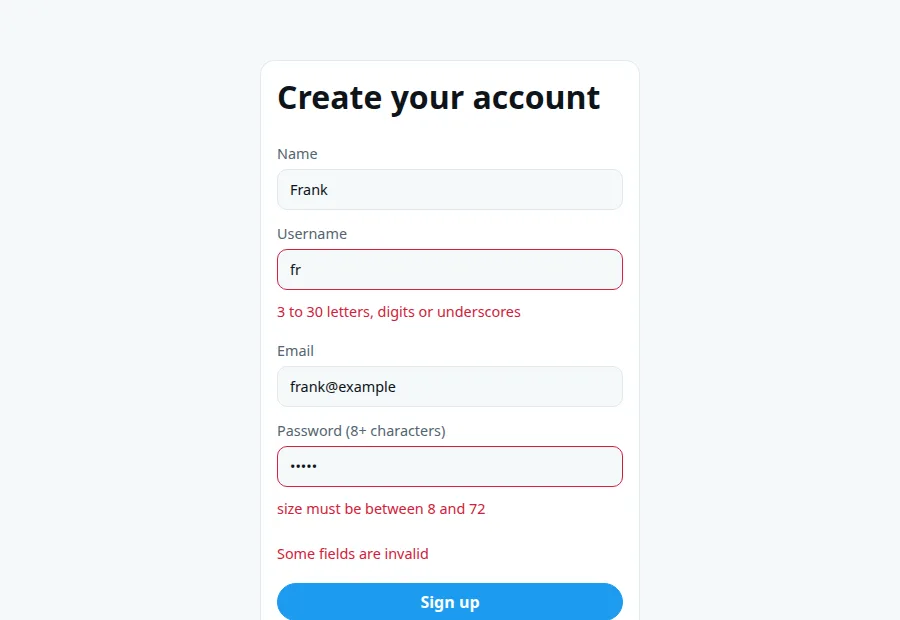
The register form has noValidate, which turns off the browser's own popups so the server's messages are shown consistently. When @Valid rejects the request, chapter 4's ApiExceptionHandler returns an errors map; ApiError carries it as fieldErrors and each input shows its message, with aria-invalid so screen readers announce the problem too. The server stays the only place the rules live (3–30 characters, 8+ characters for the password), so they can't get out of sync.
Layout, "who to follow" and the follow button
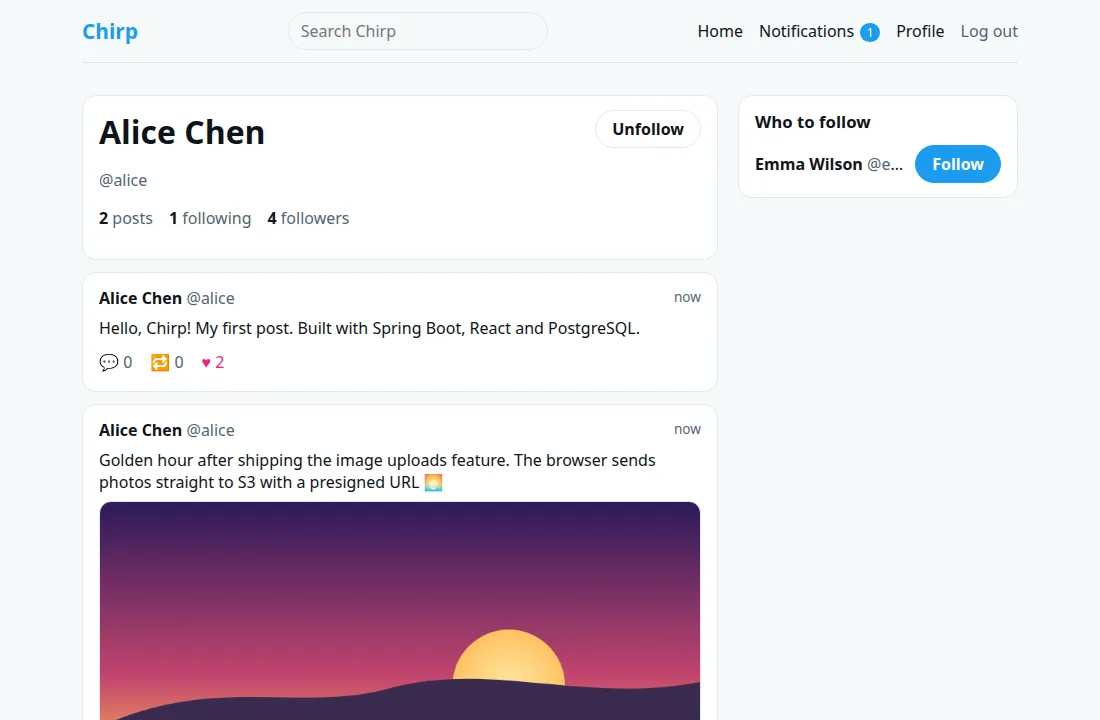
Layout is the frame around every logged-in page. NavLink is a link that adds an active CSS class when its URL is the current one (end on Home means "only exactly /"). <Outlet /> is the hole where the current page goes.
import { NavLink, Outlet } from 'react-router';
import { useAuth } from '../auth/useAuth.js';
import WhoToFollow from './WhoToFollow.jsx';

export default function Layout() {
  const { user, signOut } = useAuth();

  return (
    <div className="layout">
      <header className="topbar">
        <NavLink to="/" className="brand">Chirp</NavLink>
        <nav>
          <NavLink to="/" end>Home</NavLink>
          <NavLink to="/notifications">Notifications</NavLink>
          <NavLink to={`/u/${user.username}`}>Profile</NavLink>
          <button type="button" className="link" onClick={signOut}>Log out</button>
        </nav>
      </header>
      <main className="main">
        <Outlet />
      </main>
      <aside className="sidebar">
        <WhoToFollow />
      </aside>
    </div>
  );
}
WhoToFollow is the simplest data-loading component in the app: an empty list in state, an effect that loads suggestions once (the empty [] means "only after the first render"), and null (draw nothing) when there is nobody to suggest.
import { useEffect, useState } from 'react';
import { Link } from 'react-router';
import { getSuggestions } from '../api/chirp.js';
import FollowButton from './FollowButton.jsx';

export default function WhoToFollow() {
  const [users, setUsers] = useState([]);

  useEffect(() => {
    getSuggestions().then(setUsers).catch(() => setUsers([]));
  }, []);

  if (users.length === 0) return null;
  return (
    <section className="card">
      <h2>Who to follow</h2>
      <ul className="people">
        {users.map((u) => (
          <li key={u.id}>
            <Link to={`/u/${u.username}`}>
              <strong>{u.displayName}</strong> <span className="muted">@{u.username}</span>
            </Link>
            <FollowButton username={u.username} following={false} />
          </li>
        ))}
      </ul>
    </section>
  );
}
FollowButton keeps its own following state and a busy flag that disables the button while the request runs, so double-clicks can't send two requests. The optional onChange?.(…) lets the profile page update its follower count; in the sidebar nobody passes it.
import { useState } from 'react';
import { setFollowing } from '../api/chirp.js';

export default function FollowButton({ username, following: initial, onChange }) {
  const [following, setFollowingState] = useState(initial);
  const [busy, setBusy] = useState(false);

  async function toggle() {
    setBusy(true);
    try {
      await setFollowing(username, !following);
      setFollowingState(!following);
      onChange?.(!following);
    } finally {
      setBusy(false);
    }
  }

  return (
    <button type="button" className={following ? 'btn' : 'btn primary'} disabled={busy} onClick={toggle}>
      {following ? 'Unfollow' : 'Follow'}
    </button>
  );
}
The home feed
usePagedPosts: a custom hook for "load more"
Both the home feed and profile pages show "a list of posts, 20 at a time, with Load more". That logic lives in a custom hook: a function that uses other hooks and returns values. It is how React apps share behaviour between components.
import { useCallback, useEffect, useState } from 'react';

/**
 * Loads a list of posts page by page. fetchPage(cursor) must return { items, nextCursor }.
 * Wrap fetchPage in useCallback, or this hook reloads on every render.
 */
export function usePagedPosts(fetchPage) {
  const [posts, setPosts] = useState([]);
  const [cursor, setCursor] = useState(null);
  const [loading, setLoading] = useState(true);
  const [error, setError] = useState('');

  useEffect(() => {
    let ignore = false;   // the page was left before the answer came: don't update it
    fetchPage(null)
      .then((page) => {
        if (ignore) return;
        setPosts(page.items);
        setCursor(page.nextCursor);
      })
      .catch((err) => !ignore && setError(err.message))
      .finally(() => !ignore && setLoading(false));
    return () => {
      ignore = true;
    };
  }, [fetchPage]);

  const loadMore = useCallback(async () => {
    setLoading(true);
    try {
      const page = await fetchPage(cursor);
      setPosts((current) => [...current, ...page.items]);
      setCursor(page.nextCursor);
    } catch (err) {
      setError(err.message);
    } finally {
      setLoading(false);
    }
  }, [fetchPage, cursor]);

  const prepend = useCallback((post) => setPosts((current) => [post, ...current]), []);
  const replace = useCallback(
    (post) => setPosts((current) => current.map((p) => (p.id === post.id ? post : p))),
    [],
  );
  const remove = useCallback((id) => setPosts((current) => current.filter((p) => p.id !== id)), []);

  return { posts, hasMore: cursor !== null, loading, error, loadMore, prepend, replace, remove };
}
It follows the cursor pagination from chapter 4: ask for cursor=null, remember nextCursor, and when the user presses Load more, ask for posts older than it and append them. hasMore is simply "do we have a cursor?". It's derived from state rather than stored separately, so it can never disagree with it.
The ignore flag guards against a subtle bug. Requests take time, and the user can leave a page before the answer arrives. Step through what happens without it:
- You open Alice's profile. The effect starts loading her posts. The server is slow today.
- Before it answers, you click through to Bob. The old effect's cleanup runs (
ignore = true) and a new effect asks for Bob's posts. - Bob's posts arrive first and are shown. Correct so far.
- Now Alice's late answer arrives. Without the flag,
setPostswould put Alice's posts on Bob's page. With it, the old callback seesignore === trueand does nothing.
Why must fetchPage be stable?
The effect lists [fetchPage] as a dependency: it re-runs whenever fetchPage is a different function. If a component wrote usePagedPosts((c) => getFeed(c)), a brand-new arrow function would be created on every render, the effect would reload, the state change would re-render… an endless loop of requests. FeedPage passes getFeed, defined once at module level; ProfilePage wraps its function in useCallback so it only changes when username changes.
FeedPage and PostList
With the hook doing the work, the page is tiny. {...feed} passes every field the hook returned (posts, hasMore, loadMore, …) as props to PostList.
import { getFeed } from '../api/chirp.js';
import PostComposer from '../components/PostComposer.jsx';
import PostList from '../components/PostList.jsx';
import { usePagedPosts } from '../hooks/usePagedPosts.js';

export default function FeedPage() {
  // getFeed is defined outside any component, so it never changes and the feed loads once.
  const feed = usePagedPosts(getFeed);

  return (
    <>
      <h1 className="page-title">Home</h1>
      <PostComposer onPosted={feed.prepend} />
      <PostList {...feed} emptyText="Your feed is empty. Follow someone from “Who to follow” or write your first post." />
    </>
  );
}
import PostCard from './PostCard.jsx';
export default function PostList({ posts, hasMore, loading, error, loadMore, replace, remove, emptyText }) {
return (
<div className="post-list">
{posts.map((post) => (
<PostCard key={post.id} post={post} onChange={replace} onDelete={remove} />
))}
{!loading && posts.length === 0 && !error && <p className="card muted">{emptyText}</p>}
{error && <p className="error">{error}</p>}
{loading && <p className="muted center">Loading…</p>}
{hasMore && !loading && (
<button type="button" className="btn wide" onClick={loadMore}>Load more</button>
)}
</div>
);
}The key={post.id} on each card tells React which card is which between renders. When a new post is prepended, React moves the existing cards down instead of rebuilding them all, and the state inside each card stays with the right post.
PostComposer: a controlled textarea with a counter
import { useState } from 'react';
import { createPost } from '../api/chirp.js';

const MAX = 280;

export default function PostComposer({ onPosted }) {
  const [content, setContent] = useState('');
  const [error, setError] = useState('');
  const [sending, setSending] = useState(false);
  const left = MAX - content.length;

  async function handleSubmit(event) {
    event.preventDefault();
    setSending(true);
    setError('');
    try {
      const post = await createPost(content);
      onPosted(post);          // show it at the top of the feed straight away
      setContent('');
    } catch (err) {
      setError(err.message);
    } finally {
      setSending(false);
    }
  }

  return (
    <form className="card composer" onSubmit={handleSubmit}>
      <textarea
        value={content}
        onChange={(e) => setContent(e.target.value)}
        placeholder="What's happening?"
        maxLength={MAX}
        rows={3}
        aria-label="Write a post"
      />
      <div className="composer-bar">
        <span className={left < 20 ? 'count warn' : 'count'}>{left}</span>
        <button type="submit" className="btn primary" disabled={sending || content.trim() === ''}>
          {sending ? 'Posting…' : 'Post'}
        </button>
      </div>
      {error && <p className="error">{error}</p>}
    </form>
  );
}
left isn't stored in state; it's calculated from content on every render, so it is always right. maxLength stops typing at 280 in the browser, but the server checks again with @Size(max = 280): the browser is a convenience, the server is the rule. After a successful post, onPosted(post) puts the server's version (with its real id and time) at the top of the feed, without reloading the feed.
PostCard and optimistic updates
import { Link } from 'react-router';
import { deletePost, setLiked, setReposted } from '../api/chirp.js';
import { useAuth } from '../auth/useAuth.js';
import { timeAgo } from '../utils/timeAgo.js';

export default function PostCard({ post, onChange, onDelete }) {
  const { user } = useAuth();
  const mine = user.id === post.author.id;

  // Optimistic update: change the screen first, then tell the server, and undo if it fails.
  async function toggleLike() {
    const liked = !post.likedByMe;
    onChange({ ...post, likedByMe: liked, likeCount: post.likeCount + (liked ? 1 : -1) });
    try {
      const result = await setLiked(post.id, liked);
      onChange({ ...post, likedByMe: result.liked, likeCount: result.likeCount });
    } catch {
      onChange(post);
    }
  }

  async function toggleRepost() {
    const reposted = !post.repostedByMe;
    onChange({ ...post, repostedByMe: reposted, repostCount: post.repostCount + (reposted ? 1 : -1) });
    try {
      const result = await setReposted(post.id, reposted);
      onChange({ ...post, repostedByMe: result.reposted, repostCount: result.repostCount });
    } catch {
      onChange(post);
    }
  }

  async function handleDelete() {
    await deletePost(post.id);
    onDelete(post.id);
  }

  return (
    <article className="card post">
      <header>
        <Link to={`/u/${post.author.username}`} className="author">
          <strong>{post.author.displayName}</strong> <span className="muted">@{post.author.username}</span>
        </Link>
        <Link to={`/posts/${post.id}`} className="muted time" title={new Date(post.createdAt).toLocaleString()}>
          {timeAgo(post.createdAt)}
        </Link>
      </header>
      {/* React escapes this text, so a post containing <script> is shown, not run. */}
      <p className="content">{post.content}</p>
      {post.imageUrl && <img className="post-image" src={post.imageUrl} alt="" loading="lazy" />}
      <footer className="actions">
        <Link to={`/posts/${post.id}`} className="action">💬 {post.commentCount}</Link>
        <button type="button" className={post.repostedByMe ? 'action repost on' : 'action repost'} onClick={toggleRepost}
                aria-pressed={post.repostedByMe}>
          🔁 {post.repostCount}
        </button>
        <button type="button" className={post.likedByMe ? 'action like on' : 'action like'} onClick={toggleLike}
                aria-pressed={post.likedByMe}>
          {post.likedByMe ? '♥' : '♡'} {post.likeCount}
        </button>
        {mine && <button type="button" className="action danger" onClick={handleDelete}>Delete</button>}
      </footer>
    </article>
  );
}
When you press ♡, toggleLike does something that looks backwards: it updates the screen first, assuming the server will agree, then sends the request. When the answer arrives it uses the server's real count (someone else may have liked it in the meantime). If the request fails, it puts the old post back. This is an optimistic update. Most of the time the server agrees, so the app feels instant, and on the rare failure the user sees the like undo itself.
Feel the difference. This is simulated in your browser: no request leaves this page, but the delay and the failure behave like a real slow or broken server.
The post
What happened
Try three things: optimistic with a 2-second delay (instant), "wait for the server" with the same delay (sluggish), and optimistic with "Make the server fail" (the heart fills, then undoes itself). Optimistic updates suit actions that almost always succeed and are easy to undo, like likes and follows. For actions with real consequences (payments, deleting an account) wait for the server.
Profiles, single posts, replies and notifications
ProfilePage: resetting state with key
import { useCallback, useEffect, useState } from 'react';
import { useParams } from 'react-router';
import { getProfile, getUserPosts } from '../api/chirp.js';
import { useAuth } from '../auth/useAuth.js';
import FollowButton from '../components/FollowButton.jsx';
import PostList from '../components/PostList.jsx';
import { usePagedPosts } from '../hooks/usePagedPosts.js';

export default function ProfilePage() {
  const { username } = useParams();
  // key: going from /u/alice to /u/bob creates a fresh Profile, so no state leaks between users.
  return <Profile key={username} username={username} />;
}

function Profile({ username }) {
  const { user } = useAuth();
  const [profile, setProfile] = useState(null);
  const [error, setError] = useState('');
  const loadPosts = useCallback((cursor) => getUserPosts(username, cursor), [username]);
  const posts = usePagedPosts(loadPosts);

  useEffect(() => {
    let ignore = false;
    getProfile(username)
      .then((p) => !ignore && setProfile(p))
      .catch((err) => !ignore && setError(err.message));
    return () => {
      ignore = true;
    };
  }, [username]);

  if (error) return <p className="error">{error}</p>;
  if (!profile) return <p className="muted center">Loading…</p>;

  const followChanged = (following) =>
    setProfile((p) => ({ ...p, followedByMe: following, followerCount: p.followerCount + (following ? 1 : -1) }));

  return (
    <>
      <section className="card profile">
        <div>
          <h1>{profile.displayName}</h1>
          <p className="muted">@{profile.username}</p>
          {profile.bio && <p>{profile.bio}</p>}
          <p className="stats">
            <span><strong>{profile.postCount}</strong> posts</span>
            <span><strong>{profile.followingCount}</strong> following</span>
            <span><strong>{profile.followerCount}</strong> followers</span>
          </p>
        </div>
        {user.id !== profile.id && (
          <FollowButton username={profile.username} following={profile.followedByMe} onChange={followChanged} />
        )}
      </section>
      <PostList {...posts} emptyText="No posts yet." />
    </>
  );
}
useParams() reads :username from the URL. Going from /u/alice to /u/bob does not unmount the page: React Router reuses the same component, so all of Alice's state (her profile, her posts, the cursor) would linger while Bob's loads. The wrapper solves it with one prop: <Profile key={username} …/>. A different key tells React "this is a different thing": it throws the old component away and starts a fresh one with empty state.
After following, followChanged uses the updater form setProfile((p) => …), which receives the latest state, so the count stays right even if two updates happen quickly. The follow button is hidden on your own profile; the server would refuse anyway ("You cannot follow yourself").
PostPage and CommentSection
import { useEffect, useState } from 'react';
import { useNavigate, useParams } from 'react-router';
import { getPost } from '../api/chirp.js';
import CommentSection from '../components/CommentSection.jsx';
import PostCard from '../components/PostCard.jsx';

export default function PostPage() {
  const { id } = useParams();
  const navigate = useNavigate();
  const [post, setPost] = useState(null);
  const [error, setError] = useState('');

  useEffect(() => {
    let ignore = false;
    getPost(id)
      .then((p) => !ignore && setPost(p))
      .catch((err) => !ignore && setError(err.message));
    return () => {
      ignore = true;
    };
  }, [id]);

  if (error) return <p className="error">{error}</p>;
  if (!post) return <p className="muted center">Loading…</p>;

  return (
    <>
      <PostCard post={post} onChange={setPost} onDelete={() => navigate('/')} />
      <CommentSection
        postId={post.id}
        onAdded={() => setPost((p) => ({ ...p, commentCount: p.commentCount + 1 }))}
      />
    </>
  );
}
PostPage reuses PostCard: likes work here too because onChange={setPost} just replaces the one post in state. Deleting from this page goes back home with navigate('/'), since the post no longer exists.
import { useEffect, useState } from 'react';
import { Link } from 'react-router';
import { addComment, getComments } from '../api/chirp.js';
import { timeAgo } from '../utils/timeAgo.js';

export default function CommentSection({ postId, onAdded }) {
  const [comments, setComments] = useState([]);
  const [page, setPage] = useState(0);
  const [totalPages, setTotalPages] = useState(0);
  const [content, setContent] = useState('');
  const [error, setError] = useState('');

  useEffect(() => {
    let ignore = false;
    getComments(postId, 0)
      .then((result) => {
        if (ignore) return;
        setComments(result.items);
        setTotalPages(result.totalPages);
      })
      .catch((err) => !ignore && setError(err.message));
    return () => {
      ignore = true;
    };
  }, [postId]);

  async function loadMore() {
    const result = await getComments(postId, page + 1);
    // Offset pages shift when new comments arrive, so skip any we already show.
    setComments((current) => {
      const shown = new Set(current.map((c) => c.id));
      return [...current, ...result.items.filter((c) => !shown.has(c.id))];
    });
    setPage(result.page);
  }

  async function handleSubmit(event) {
    event.preventDefault();
    setError('');
    try {
      const comment = await addComment(postId, content);
      setComments((current) => [...current, comment]);
      setContent('');
      onAdded();
    } catch (err) {
      setError(err.message);
    }
  }

  return (
    <section className="comments">
      <form className="card composer" onSubmit={handleSubmit}>
        <textarea value={content} onChange={(e) => setContent(e.target.value)} maxLength={280} rows={2}
                  placeholder="Write a reply" aria-label="Write a reply" />
        <div className="composer-bar">
          <span />
          <button type="submit" className="btn primary" disabled={content.trim() === ''}>Reply</button>
        </div>
        {error && <p className="error">{error}</p>}
      </form>
      {comments.map((c) => (
        <article key={c.id} className="card comment">
          <header>
            <Link to={`/u/${c.author.username}`} className="author">
              <strong>{c.author.displayName}</strong> <span className="muted">@{c.author.username}</span>
            </Link>
            <span className="muted time">{timeAgo(c.createdAt)}</span>
          </header>
          <p className="content">{c.content}</p>
        </article>
      ))}
      {page + 1 < totalPages && <button type="button" className="btn wide" onClick={loadMore}>More replies</button>}
    </section>
  );
}
Replies use the offset pagination from chapter 4 (page=0, 1, 2…), oldest first. Offset pages have a known weakness: if a reply is added while you read, every later page shifts by one, and the next page can start with a reply you already have. Our own new replies cause exactly that, because we append them locally. So loadMore skips any id already on screen. This is one reason the feed uses cursors instead.
NotificationsPage
import { useEffect, useState } from 'react';
import { Link } from 'react-router';
import { getNotifications, markNotificationsRead } from '../api/chirp.js';
import { timeAgo } from '../utils/timeAgo.js';

const TEXT = {
  LIKE: 'liked your post',
  REPOST: 'reposted your post',
  COMMENT: 'replied to your post',
  FOLLOW: 'followed you',
};

export default function NotificationsPage() {
  const [items, setItems] = useState(null);

  useEffect(() => {
    getNotifications()
      .then((list) => {
        setItems(list);
        if (list.some((n) => !n.read)) markNotificationsRead();
      })
      .catch(() => setItems([]));
  }, []);

  if (!items) return <p className="muted center">Loading…</p>;
  return (
    <>
      <h1 className="page-title">Notifications</h1>
      {items.length === 0 && <p className="card muted">Nothing yet. Likes, replies and follows show up here.</p>}
      {items.map((n) => (
        <article key={n.id} className={n.read ? 'card note' : 'card note unread'}>
          <Link to={`/u/${n.actor.username}`}><strong>{n.actor.displayName}</strong></Link>{' '}
          {n.postId ? <Link to={`/posts/${n.postId}`}>{TEXT[n.type]}</Link> : TEXT[n.type]}
          <span className="muted time">{timeAgo(n.createdAt)}</span>
        </article>
      ))}
    </>
  );
}
The TEXT object maps the backend's type (LIKE, FOLLOW…) to words, so the API stays language-neutral and the wording lives in the UI. Opening the page marks everything read. In this MVP version you see new notifications when you open or reload the page; chapter 6 adds a live badge over a WebSocket.
timeAgo and the stylesheet
A small pure function: same input, same output, no React. That makes it trivial to test (chapter 8 talks about unit tests).
// "now", "5m", "3h", "2d", then a date such as "Nov 5". Like the timestamps on Twitter.
export function timeAgo(isoDate, now = Date.now()) {
  const seconds = Math.floor((now - new Date(isoDate).getTime()) / 1000);
  if (seconds < 60) return 'now';
  const minutes = Math.floor(seconds / 60);
  if (minutes < 60) return `${minutes}m`;
  const hours = Math.floor(minutes / 60);
  if (hours < 24) return `${hours}h`;
  const days = Math.floor(hours / 24);
  if (days < 7) return `${days}d`;
  return new Date(isoDate).toLocaleDateString('en', { month: 'short', day: 'numeric' });
}
All styling is one plain CSS file with variables. The layout is a CSS grid: feed plus a 280 px sidebar, collapsing to one column under 760 px. Dark mode is one media query that swaps the variables. Note minmax(0, 1fr) and min-width: 0: grid and flex items otherwise refuse to shrink below their content, and a long username would push the page sideways on phones.
/* Chirp: plain CSS with variables. Light by default, dark when the system asks for it. */
:root {
  --bg: #f5f8fa;
  --card: #ffffff;
  --text: #0f1419;
  --muted: #536471;
  --line: #e1e8ed;
  --accent: #1d9bf0;
  --accent-text: #ffffff;
  --like: #f91880;
  --danger: #d0213a;
  font-family: system-ui, -apple-system, 'Segoe UI', Roboto, sans-serif;
  color: var(--text);
  background: var(--bg);
}
@media (prefers-color-scheme: dark) {
  :root {
    --bg: #000000;
    --card: #16181c;
    --text: #e7e9ea;
    --muted: #8b98a5;
    --line: #2f3336;
  }
}

* { box-sizing: border-box; }
body { margin: 0; }
a { color: var(--accent); text-decoration: none; }
a:hover { text-decoration: underline; }
h1, h2 { margin: 0 0 12px; }
.muted { color: var(--muted); }
.center { text-align: center; }
.error { color: var(--danger); font-size: 0.9rem; margin: 6px 0; display: block; }

/* Layout: nav on top, feed in the middle, "who to follow" on the right (below on phones). */
.layout {
  max-width: 960px;
  margin: 0 auto;
  padding: 0 12px 40px;
  display: grid;
  grid-template-columns: minmax(0, 1fr) 280px;
  gap: 20px;
}
.topbar {
  grid-column: 1 / -1;
  display: flex;
  align-items: center;
  justify-content: space-between;
  flex-wrap: wrap;
  gap: 8px;
  padding: 12px 0;
  border-bottom: 1px solid var(--line);
}
.brand { font-weight: 800; font-size: 1.3rem; }
.topbar nav { display: flex; gap: 16px; align-items: center; flex-wrap: wrap; }
.topbar nav a { color: var(--text); }
.topbar nav a.active { color: var(--accent); font-weight: 600; }
@media (max-width: 760px) {
  .layout { grid-template-columns: minmax(0, 1fr); }
}

.page-title { font-size: 1.25rem; margin-top: 16px; }
.card {
  background: var(--card);
  border: 1px solid var(--line);
  border-radius: 14px;
  padding: 14px 16px;
  margin: 12px 0;
}

/* Buttons */
.btn {
  border: 1px solid var(--line);
  background: var(--card);
  color: var(--text);
  border-radius: 999px;
  padding: 7px 16px;
  font: inherit;
  font-weight: 600;
  cursor: pointer;
}
.btn.primary { background: var(--accent); border-color: var(--accent); color: var(--accent-text); }
.btn:disabled { opacity: 0.55; cursor: default; }
.btn.wide { width: 100%; }
button.link { background: none; border: 0; color: var(--muted); font: inherit; cursor: pointer; padding: 0; }

/* Forms */
.auth { max-width: 380px; margin: 60px auto; display: grid; gap: 14px; }
label { display: grid; gap: 6px; font-size: 0.9rem; color: var(--muted); }
input, textarea {
  font: inherit;
  color: var(--text);
  background: var(--bg);
  border: 1px solid var(--line);
  border-radius: 10px;
  padding: 10px 12px;
  width: 100%;
}
input[aria-invalid='true'] { border-color: var(--danger); }
textarea { resize: vertical; }
.composer-bar { display: flex; justify-content: space-between; align-items: center; margin-top: 8px; gap: 8px; }
.count { color: var(--muted); font-size: 0.85rem; }
.count.warn { color: var(--danger); }

/* Posts */
.post header, .comment header { display: flex; justify-content: space-between; gap: 8px; }
.author { color: var(--text); min-width: 0; overflow: hidden; text-overflow: ellipsis; white-space: nowrap; }
.time { font-size: 0.85rem; white-space: nowrap; }
.content { white-space: pre-wrap; overflow-wrap: anywhere; margin: 8px 0; }
.post-image { width: 100%; max-height: 420px; object-fit: cover; border-radius: 12px; border: 1px solid var(--line); }
.actions { display: flex; gap: 18px; margin-top: 6px; }
.action {
  background: none;
  border: 0;
  padding: 4px 0;
  color: var(--muted);
  font: inherit;
  cursor: pointer;
}
.action.on { color: var(--like); }
.action.danger { margin-left: auto; color: var(--danger); }

/* Profile, people, notifications */
.profile { display: flex; justify-content: space-between; align-items: flex-start; gap: 12px; }
.stats { display: flex; gap: 16px; flex-wrap: wrap; color: var(--muted); }
.stats strong { color: var(--text); }
.people { list-style: none; padding: 0; margin: 0; display: grid; gap: 12px; }
.people li { display: flex; justify-content: space-between; align-items: center; gap: 8px; min-width: 0; }
.people a { flex: 1; color: var(--text); min-width: 0; overflow: hidden; text-overflow: ellipsis; white-space: nowrap; }
.people .btn { flex: none; }
.note { display: flex; gap: 6px; flex-wrap: wrap; align-items: baseline; }
.note a + a { color: var(--text); }
.note .time { margin-left: auto; }
.note.unread { border-left: 4px solid var(--accent); }
.sidebar h2 { font-size: 1.05rem; }
Run it
You need the backend from chapter 4 running on port 8080 (with PostgreSQL from docker compose up -d). Then, in a second terminal:
cd chirp/frontend
npm run dev
> chirp-frontend@0.0.1 dev
> vite
VITE v8.3.6 ready in 167 ms
➜ Local: http://localhost:5173/
➜ Network: use --host to exposeOpen http://localhost:5173. You land on /login. Walk through the whole loop:
- Create an account alice, and write a post. It appears at the top of the feed immediately.
- Open a private window (so it has its own
localStorage) and create bob. Bob's feed is empty: he follows nobody yet. - Bob clicks Follow next to Alice in "Who to follow", then Home: Alice's post is in his feed. He likes it and replies.
- Back in Alice's window, open Notifications: "Bob followed you", "Bob liked your post", "Bob replied to your post".
- Alice deletes the post from its page and is sent home. Bob reloads: it's gone (the database cascade from chapter 3 removed the likes and replies too).
This exact flow, two users, posting, following, liking, replying, notifications and logging out, is what the automated browser test for this course clicks through on every run.
Before calling it done, run the linter and a production build:
npm run lint
npm run build
> chirp-frontend@0.0.1 lint
> oxlint
Found 0 warnings and 0 errors.
Finished in 13ms on 23 files with 104 rules using 12 threads.
> chirp-frontend@0.0.1 build
> vite build
vite v8.3.6 building client environment for production...
transforming...
✓ 113 modules transformed.
rendering chunks...
computing gzip size...
dist/index.html 0.45 kB │ gzip: 0.29 kB
dist/assets/index-C7KHEE7J.css 3.51 kB │ gzip: 1.26 kB
dist/assets/index-CNMQAPT7.js 272.10 kB │ gzip: 85.65 kB
✓ built in 157msdist/ is the whole frontend: one HTML file, one CSS file and one JavaScript file, with a content hash in their names so they can be cached forever. They are static files, so they could be served by nginx, S3 + CloudFront or any web host. Chapter 8 serves them from nginx in Docker.
Common mistakes
The page reloads when a form is submitted
A <form>'s default behaviour is to send the page to the server and reload it, wiping all state. The request to the API never finishes.
Fix: call event.preventDefault() first in every submit handler, as all our forms do.
"Blocked by CORS policy" in the console
The code calls fetch('http://localhost:8080/api/feed'). That is a different origin from the page (port 5173), so the browser blocks reading the answer.
Fix: call relative URLs (/api/feed) and let the Vite proxy forward them. Restart npm run dev after editing vite.config.js.
Every request fails with 500 or "ECONNREFUSED" in the Vite terminal
The proxy works, but nothing is listening on port 8080.
Fix: start the backend (./mvnw spring-boot:run -Dspring-boot.run.profiles=dev) and check it answers: curl -i localhost:8080/api/feed should give 401.
npm installed react-router 7 instead of 8
React Router 8 needs Node.js 22.22 or newer. With an older Node, npm install react-router quietly picked the newest version whose requirements matched, a 7.x release, when we tried it on Node 22.14.
Fix: use Node 24 (node -v), delete node_modules and package-lock.json, and install again. Check package.json says "react-router": "^8…".
Missing key, or using the array index as the key
React warns about missing keys. Using index silences the warning but breaks when items are inserted at the top: after a new post is prepended, every card gets the key of the card that used to be there.
Fix: use a stable id from the data: key={post.id}.
A function created in render used as an effect dependency
// A new function every render → the effect re-runs → state changes → render → …
const feed = usePagedPosts((cursor) => getFeed(cursor));
The network tab fills with endless /api/feed requests.
Fix: pass a function defined outside the component (getFeed), or wrap it in useCallback with the values it depends on.
"My effect runs twice!"
In development, StrictMode mounts each component, unmounts it and mounts it again, to prove that effects clean up after themselves. You'll see /api/auth/me twice in the network tab.
Fix: nothing to fix: it only happens in development. Do make sure effects have a cleanup (our ignore flag), so running twice is harmless.
Stale state in a closure
setCount(count + 1) uses the count from the render the function was created in. Two quick updates both read the same old value, and one is lost (the same lost update as in the database, chapter 1).
Fix: when the new value depends on the old one, use the updater form: setPosts((current) => [post, ...current]), as usePagedPosts does everywhere.
Rendering user text with dangerouslySetInnerHTML
A post containing <img src=x onerror=…> would run its script in every reader's browser and could steal their token from localStorage.
Fix: render user content with {post.content}. If you ever need rich text, sanitise it first with a library such as DOMPurify.
Keeping derived values in state
Storing hasMore or charactersLeft in their own useState means updating two things every time, and one day forgetting one.
Fix: compute them during render from the state you already have, like left = MAX - content.length.
Key takeaways
- Vite builds and serves the React app; its proxy forwards
/apito Spring Boot so the browser never needs CORS. - A React screen is a function of state: change state with a setter and React redraws what changed.
- One API layer adds the token, parses JSON, turns problem details into errors and handles expired tokens.
- Context shares "who is logged in"; a pathless route renders
Layoutor redirects, protecting every page at once. - A custom hook (
usePagedPosts) shares "load more" logic; theignoreflag stops late answers from landing on the wrong page. - Optimistic updates make likes feel instant; always use the server's answer and roll back on failure.
- The frontend improves the experience; the backend enforces every rule.
Check your understanding
Why doesn't Chirp need any CORS configuration in development?
- Spring Boot allows all origins by default
- The browser only talks to Vite on its own origin, and Vite forwards
/apito Spring Boot - CORS only applies to POST requests
localhost:5173, the page's own origin; the forwarding happens between Vite and Spring Boot, where browser rules don't apply.You navigate from /u/alice to /u/bob. What makes the profile start with empty state instead of showing Alice's data while Bob's loads?
useParams()- The
ignoreflag key={username}on theProfilecomponentStrictMode
key makes React discard the old component and its state and create a fresh one. (The ignore flag only stops a late answer from being applied; it doesn't clear what's already there.)In an optimistic like, the request fails. What should the card show?
- The post as it was before the click
- The optimistic version, since the user clicked
- Nothing: remove the card
PostCard calls onChange(post) with the original post in its catch, rolling the screen back to the truth.A user deletes the "Delete" button's mine check in the browser's developer tools and clicks Delete on someone else's post. What happens?
- The post is deleted, because the frontend allowed it
- The server answers 403 and nothing is deleted
- The token is revoked
PostService.delete, which checks the author against the token's user and returns 403 Forbidden.Exercise: a "Show new posts" button
Real feeds don't jump while you read; they show a "N new posts" button instead. Add one to FeedPage: every 60 seconds, fetch the first page of the feed, count the posts newer than the one at the top of the screen, and show a button that prepends them when clicked. No backend changes are needed. Hints: setInterval inside a useEffect with a cleanup, and post ids grow over time (chapter 3).
Show a sample answer
A small hook keeps the polling separate from the page. It only looks at the first page, which is enough for a reminder button:
import { useEffect, useState } from 'react';
import { getFeed } from '../api/chirp.js';

// Every minute, check whether the feed has posts newer than newestId.
export function useNewPosts(newestId) {
  const [fresh, setFresh] = useState([]);

  useEffect(() => {
    const timer = setInterval(() => {
      getFeed(null)
        .then((page) => setFresh(page.items.filter((p) => newestId == null || p.id > newestId)))
        .catch(() => {});
    }, 60_000);
    return () => clearInterval(timer);   // stop polling when the page goes away
  }, [newestId]);

  return [fresh, () => setFresh([])];
}
In FeedPage, the newest id is the first post's. Showing the button and prepending uses what usePagedPosts already offers (iterate oldest first so the newest ends up on top):
const [fresh, clearFresh] = useNewPosts(feed.posts[0]?.id);

function showFresh() {
  [...fresh].reverse().forEach(feed.prepend);
  clearFresh();
}

// in the JSX, above <PostList>:
{fresh.length > 0 && (
  <button type="button" className="btn wide" onClick={showFresh}>
    Show {fresh.length} new post{fresh.length === 1 ? '' : 's'}
  </button>
)}
Because the effect depends on newestId, posting yourself (which changes the top post) restarts the timer with the new id, so your own post never counts as "new". Chapter 6 shows the push alternative, where the server tells the browser instead of the browser asking.
Finished this chapter? Tick it off. Progress is saved in this browser only.