What you will learn
- What Twitter (X) really does, reduced to a few core ideas
- Every feature we will build, and what each one needs behind the scenes
- How to split features into an MVP and "later"
- The technology stack, why we chose it, and the alternatives
- How to set up your computer for the rest of the course
Why it matters
Most failed side projects don't fail because of bad code. They fail because they try to build everything at once and never ship. Deciding what to build first, and what can wait, is a real engineering skill. Senior engineers spend a surprising amount of time on exactly this step.
What is Twitter (X), really?
Twitter, now called X, looks complicated: timelines, trends, ads, video, messages, lists, communities. Remove everything that isn't essential, though, and the product is a simple loop:
- People write short public posts (originally 140 characters, later 280).
- People follow other people. Following is one-way: you can follow someone who doesn't follow you back.
- Each person has a home feed (timeline): the newest posts from the people they follow.
- People react to posts (like, reply, repost), and the author gets a notification, which brings them back to post again.
That loop is the whole product. Everything else either feeds it (search helps you find people to follow) or decorates it (images make posts more interesting). Press Play to watch it once:
- Alice writes "Hello, Chirp!" and presses Post. Her browser sends it to our application.
- Chirp checks the post (not empty, not longer than 280 characters, Alice is logged in) and saves it in the database.
- Later, Bob opens Chirp. His browser asks for his home feed.
- Chirp asks the database for the newest posts by everyone Bob follows. Alice is one of them.
- Bob sees Alice's post at the top of his feed and likes it.
- Chirp records a notification. Alice sees "Bob liked your post", feels good, and posts again. The loop repeats.
Analogy: a town notice board
Picture a town where everyone has their own notice board. When you pin a note on yours, a helper copies it onto the boards of everyone who "follows" you. Your feed is your own board, filling up with notes from the people you chose. A Twitter clone is that helper, written in code. Keep this picture in mind: in chapter 6 we will discuss whether the helper should copy notes when they are written or when someone looks, which is the most important design decision in the whole system.
Meet Chirp: the app we will build
We will call our clone Chirp. Using our own name keeps the code free of anyone's trademarks and reminds us that we are building a Twitter-like app for learning, not a copy of X. Below is a sketch of Chirp's main screen. Click the numbered dots to see what each part does, what it needs on the server, and which chapter builds it.
Click a numbered dot on the sketch. Each one is a feature of Chirp; the same features are described in detail below.
The core features, one by one
For every feature we ask the same three questions: what does the user do, what must the system do, and is it part of the first version. Writing this down now saves a lot of rewriting later, because the answers decide the database tables (chapter 3) and the API (chapter 4).
| # | Feature | The user… | The system must… | When |
|---|---|---|---|---|
| 1 | Registration & login | creates an account, logs in, logs out | store a safe hash of the password, prove who is calling on every request | MVP ch. 4–5 |
| 2 | Create & delete posts | writes up to 280 characters, deletes their own posts | validate, save with the author and time, refuse to delete other people's posts | MVP ch. 4–5 |
| 3 | Follow & unfollow | follows people whose posts they want to see | record "A follows B", prevent following yourself or twice | MVP ch. 4–5 |
| 4 | Home feed | scrolls the newest posts from people they follow | find those posts quickly, newest first, one page at a time | MVP ch. 4–6 |
| 5 | Likes, comments & reposts | reacts to posts | count each person once, keep counts correct when many people react at the same moment | MVP ch. 4–5 |
| 6 | User profiles | views a person's name, bio, counts and posts | count followers, following and posts; list that user's posts | MVP ch. 4–5 |
| 7 | Notifications | sees who liked, replied or followed | record each event; later, push it to the browser instantly | MVP list · Later live (ch. 6) |
| 8 | Image uploads | attaches a photo to a post | store large files cheaply and safely, outside the database | Later ch. 6 |
| 9 | Search | finds people and posts by words | search text by meaning ("running" finds "run"), fast | Later ch. 6 |
A closer look at the trickier ones
Registration and login: why is "remember the password" the wrong idea?
We never store passwords. We store a hash: the output of a one-way function that turns correct-horse-battery into something like $2a$10$N9qo8uLOickgx2ZMRZoMye…. At login we hash what the user typed and compare. If the database ever leaks, attackers get hashes, not passwords. We use BCrypt, which is deliberately slow and adds a random salt, so two people with the same password get different hashes.
After login the server hands the browser a token (a JWT), which the browser sends with every later request instead of the password. Chapter 2 explains tokens with an animation; chapter 4 builds them.
The home feed: why is it the hardest feature?
Think about what "the newest posts from everyone I follow" means for the database. If Bob follows 300 people, the feed needs the latest posts by any of those 300 authors, merged and sorted by time, and it needs them every time Bob opens the app. Do that for many people at once and it becomes the busiest query in the system.
There are two classic strategies. Pull (also called fan-out on read): build the feed when someone opens it. Push (fan-out on write): when someone posts, copy the post into each follower's feed straight away. We start with pull in chapter 4 because it is simple and correct, then add push with Redis in chapter 6 and compare the two with an animation.
Likes and counts: what can go wrong with "add one"?
If two people like a post at the same moment and our code does read the count (7), add one, save 8 twice, the result is 8 instead of 9: one like is lost. This is called a race condition or lost update. We avoid it by letting the database do the addition in one step (UPDATE posts SET like_count = like_count + 1). We also make "like" idempotent: liking twice has the same effect as liking once, enforced by the database itself.
Notifications: why are they two features?
"Record that Bob liked Alice's post" is easy: one row in a table, shown in a list when Alice opens her notifications page. "Show Alice a red badge the moment it happens, without her refreshing" is harder. The browser normally only hears from the server when it asks. For that we need a connection that stays open, a WebSocket. So the list is in the MVP and the live badge comes in chapter 6.
MVP versus advanced features
An MVP (minimum viable product) is the smallest version that does the job end to end, so real people can use it and you can learn from them. It is not "a bad version". Every part of an MVP should work properly. There are just fewer parts.
MVP Chapters 3–5
- Sign up, log in, log out
- Write and delete posts (text, 280 characters)
- Follow and unfollow, "who to follow" suggestions
- Home feed with "load more"
- Like, reply and repost, with correct counts
- Profiles with counts and posts
- Notifications list
Advanced Chapters 6–8
- Redis cache and pre-built feeds (push model)
- Live notifications over WebSockets
- Image uploads to S3
- Full-text search
- Automated tests, Docker images, deployment
- Scaling: replicas, load balancers, queues (chapter 7, explained rather than built)
How do you decide? Ask of each feature: does the core loop still work without it? Without images, people can still post, follow and react, so images can wait. Without following, there is no feed at all, so following is MVP. Notice that the deciding question is about the product, not about how hard the code is. Following is easy to build; it is MVP because the product breaks without it.
The real X has many more features: direct messages, lists, bookmarks, trends, hashtags, polls, quote posts, verification, ads and algorithmic "For you" ranking. They are all built on the same foundations you will learn here, and a few of them appear as exercises.
Don't copy X's scale requirements on day one
X serves hundreds of millions of people with thousands of engineers. Your first version will have a handful of users. Designing for X's traffic before you have any users leads to complexity you can't afford: microservices, message queues, sharded databases. We will discuss those in chapter 7, at the point where they solve a real problem.
Things users never ask for, but always notice
Features are what the app does. Engineers also care about how well it does them, the non-functional requirements:
- Correctness: a like is counted once, a deleted post disappears everywhere, nobody can delete someone else's post.
- Security: passwords are hashed, every request proves who it comes from, user text can never run as code in another person's browser.
- Speed: the feed appears quickly. Social apps are read-heavy: people scroll and read far more often than they post, so reads deserve the most attention.
- Reliability: if an optional part (like the cache) fails, the app still works, just more slowly.
Each chapter points out where its code serves one of these.
The technology stack, and why
Here is what we use for each layer. Every choice is a common, well-documented option that runs on a normal laptop for free. None of them is the only right answer, so the last column lists real alternatives.
| Layer | We use | Why | Common alternatives |
|---|---|---|---|
| Frontend | React 19 + Vite | The most widely used UI library; components map neatly onto posts, cards and buttons. Vite gives instant reloads. | Vue, Svelte, Angular, Next.js |
| Backend | Java 21 + Spring Boot 4 | Mature, fast, strongly typed; Spring handles web, security, database access and validation, so we write the business rules. | Node.js (Express, NestJS), Go, Python (Django, FastAPI), Kotlin, C# (.NET) |
| Database | PostgreSQL 18 | Relational data (users follow users, users like posts) fits tables and joins perfectly; strong guarantees; built-in full-text search. | MySQL, MariaDB; Cassandra or DynamoDB at very large scale |
| Cache | Redis 8 | Keeps hot data in memory: cached profiles and pre-built feeds. | Valkey (a Redis fork), Memcached |
| Authentication | JWT | A signed token the browser sends with each request; the server can check it without a database lookup. | Server sessions with cookies, OAuth/OpenID Connect providers (Auth0, Keycloak, Cognito) |
| Real-time | WebSockets | A connection that stays open, so the server can push notifications instantly. | Server-Sent Events, long polling, managed services (Pusher, Ably) |
| File storage | AWS S3 | Cheap, durable storage for images; browsers can upload straight to it. Locally we run an S3-compatible server. | Google Cloud Storage, Azure Blob Storage, Cloudflare R2 |
| Packaging | Docker | The same container runs on your laptop and on a server; it also runs PostgreSQL and Redis for development without installing them. | Podman; plain installs; platform buildpacks |
Why not use one language (JavaScript) for everything?
You could build the backend in Node.js and share one language. Many teams do, and it is a fine choice. We use Java and Spring Boot because they are very common in companies that run large backends, they make types and structure explicit (helpful when learning), and Spring shows patterns (dependency injection, layered services, declarative security and transactions) that you will meet in most backend frameworks. Everything in chapters 2, 3, 6 and 7 applies whatever language you pick.
Why PostgreSQL and not a NoSQL database?
Our data is full of relationships: users follow users, users like posts, comments belong to posts. Relational databases are built for exactly this, and they protect correctness with constraints (a like can't point at a post that doesn't exist; a user can't like the same post twice). Large social networks did move parts of their data to other stores at enormous scale, and chapter 7 explains why, but for an MVP, and well beyond, PostgreSQL is the simpler and safer choice.
How the pieces fit
Chapter 2 explains this diagram in detail. For now, notice that the browser only ever talks to our backend (and, for image uploads, to S3), and that only the backend talks to the database and cache. Click any box for a one-line summary.
- React app (frontend)
- Runs in the user's browser. Draws the screens and sends requests to the API. It is a bundle of static files, so it can be hosted anywhere, even on S3. Built in chapter 5.
- Spring Boot API (backend)
- Our Java program. It checks who is calling, applies the rules (280 characters, only delete your own posts) and talks to storage. Built in chapter 4.
- PostgreSQL
- Stores users, posts, follows, likes, comments, reposts and notifications permanently. If it isn't here, it didn't happen. Designed in chapter 3.
- Redis
- An in-memory store for data we read very often: cached profiles and pre-built feeds. Fast, but optional: Chirp keeps working without it. Chapter 6.
- S3 (object storage)
- Stores uploaded images. The browser uploads straight to S3 using a short-lived signed URL from our API, so big files never pass through our server. Chapter 6.
The course map
Each chapter builds on the previous one, and the code from every chapter works together. Chapters 3–5 produce a working MVP; 6–8 make it fast, live, tested and deployable.
- What we are buildingFeatures, MVP, stack, setup (you are here)
- The architectureFrontend, backend, database, REST, JWT, caching, real-time
- Database designSeven tables, keys, indexes, an ER diagram, real SQL
- BackendSpring Boot API: auth, posts, follows, likes, feed
- FrontendReact pages and components wired to the API
- Advanced featuresRedis, push vs pull feeds, WebSockets, S3, search
- System designWhat changes at thousands and millions of users
- Testing & deploymentJUnit, Testcontainers, Docker, secrets, go live
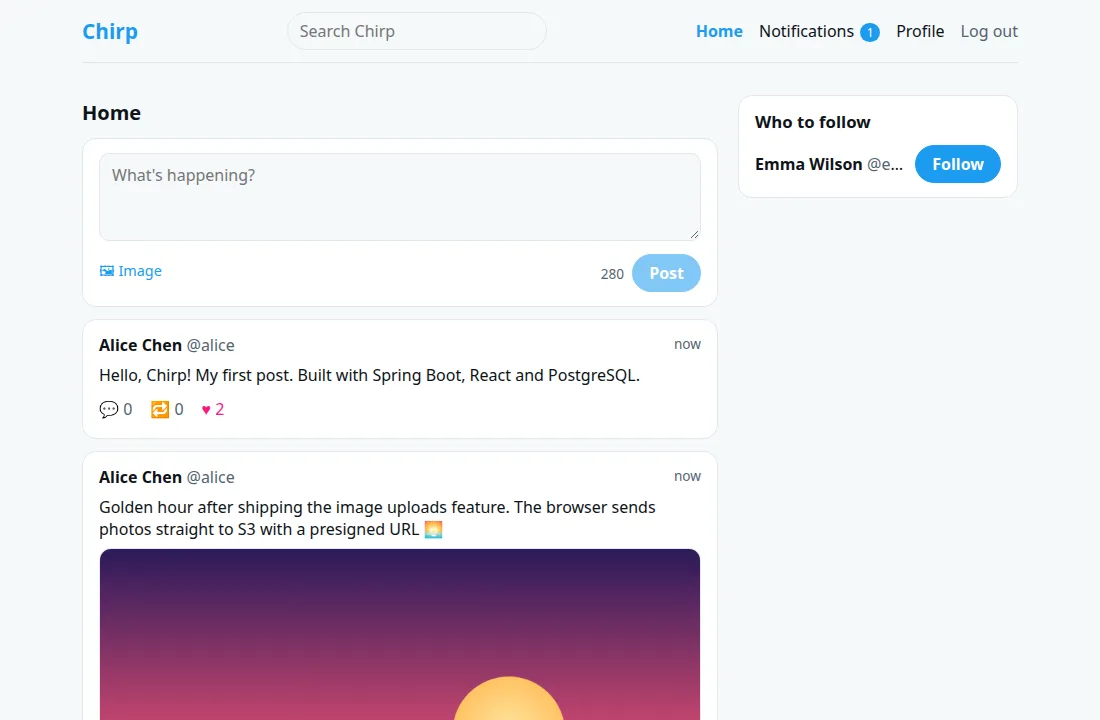
This is the app you will have at the end of chapter 6. The screenshot is of the real code from this course, running locally.
Set up your computer
You need four free tools. Install them now so later chapters can focus on code. Any operating system works: Windows, macOS or Linux.
- Java 21 (JDK). Install a JDK such as Eclipse Temurin 21 (free). Java 21 is a long-term support release; we use its records, text blocks and virtual threads.
- Node.js 24 (LTS). From nodejs.org. It runs the React development tools; npm comes with it.
- Docker Desktop (or Docker Engine on Linux) from docker.com. It runs PostgreSQL, Redis and S3 for us, so we don't install them by hand.
- An editor. IntelliJ IDEA Community (best for Java) or VS Code (good for both halves). Git is recommended, so you can commit after each chapter.
Check that everything is installed. Open a terminal and run:
java -version
node -v
npm -v
docker --version
docker compose version
You should see something like this. Exact numbers will differ; what matters is 21 for Java and 24 (or newer) for Node:
openjdk version "21.0.13" 2026-10-20 LTS
OpenJDK Runtime Environment Temurin-21.0.13+9 (build 21.0.13+9-LTS)
OpenJDK 64-Bit Server VM Temurin-21.0.13+9 (build 21.0.13+9-LTS, mixed mode, sharing)
v24.22.2
11.19.1
Docker version 29.1.3, build f52814d
Docker Compose version v2.40.2
Finally, create one folder for the whole project. The backend and frontend will live side by side inside it:
mkdir chirp
cd chirp
chirp/
├── backend/ Spring Boot API (chapter 4)
├── frontend/ React app (chapter 5)
├── s3/ bucket settings for local image uploads (chapter 6)
├── compose.yaml PostgreSQL, Redis and S3 for development
└── api-test.sh end-to-end API test (chapter 8)Common mistakes at this stage
Starting with the code instead of the features
Without a feature list, you discover halfway through that the database can't answer a question you need ("which of these posts did I like?") and rewrite it.
Fix: write the table of features and "what the system must do" first, as we did above. It takes an hour and saves days.
Putting everything in the MVP
Images, search, live updates and an algorithmic feed all at once means nothing is finished for months.
Fix: for each feature ask "does the core loop still work without it?" If yes, it can wait.
Starting with microservices
Splitting a brand-new app into many small services adds network calls, deployment work and distributed bugs before there is any traffic to justify it.
Fix: start with one well-organised backend (a "modular monolith"). Chapter 7 explains when splitting starts to pay off.
Treating security as a later feature
Plain-text passwords, or an API that trusts a user id sent by the browser, are very hard to fix once real accounts exist.
Fix: password hashing, token checks and "who owns this?" rules are part of the MVP. Chapter 4 builds them from the first endpoint.
Installing different major versions
Java 17 can't compile the Java 21 features we use (records with pattern matching, List.getLast()), and very old Node versions can't run current Vite.
Fix: check the versions with the commands above before chapter 4.
Key takeaways
- Under the surface, Twitter is a loop: post → followers' feeds → reactions → notifications → post again.
- Every feature is described by what the user does, what the system must do, and when we build it.
- The MVP is the smallest version where the loop works end to end, and every part of it works properly.
- The home feed is the hardest feature, because it is read constantly and depends on everyone you follow.
- Our stack: React, Java 21 + Spring Boot, PostgreSQL, Redis, JWT, WebSockets, S3 and Docker, each with good alternatives.
Check your understanding
Which feature must be in the MVP because the product doesn't work without it?
- Image uploads
- Full-text search
- Following other users
- Live notification badges
Two people like the same post at the same moment. The code reads the count (7), adds one and saves it, twice. What is saved?
- 9, correctly
- 8, so one like is lost
- An error is shown to both people
Why do we store a hash of the password instead of the password?
- If the database leaks, attackers don't get the real passwords
- Hashes take less disk space
- It makes login faster
Exercise: plan one more feature
Pick a feature X has and Chirp doesn't: bookmarks, quote posts or direct messages. On paper, fill in the same columns as our feature table: what the user does, what the system must do, and whether it belongs in an MVP. Then write one sentence on what data it needs to store.
Show a sample answer for bookmarks
User: saves a post privately to read later, and opens a "Bookmarks" page. System: remember "user U bookmarked post P", at most once, visible only to U; list them newest first; remove them when the post is deleted. MVP? No: the core loop works without it. Data: a bookmarks table with user_id, post_id and created_at, primary key (user_id, post_id). That has exactly the same shape as the likes table you will design in chapter 3.
Finished this chapter? Tick it off. Progress is saved in this browser only.